Through the Member Portal you can now go to our directory (“All Members”), where every member is represented by a profile and put on a map. The profiles are connected to your regular/old profiles and can be modified by clicking on your name in the upper right corner. In order to make finding and connecting with members easier, we encourage everyone to add links to their google scholar and researchgate profiles as well as Orchid ID and other social media. You are now also able to indicate your research interests and we invite you to tell others a bit more about your research projects.
Profile pictures and cover images are also always welcome.
For any information you do not want shown on your profile, you can use the eye indicator to the right to hide a specific field. Of course, you can also choose to opt out of the member directory altogether by navigating from the Member Portal to “directories”.
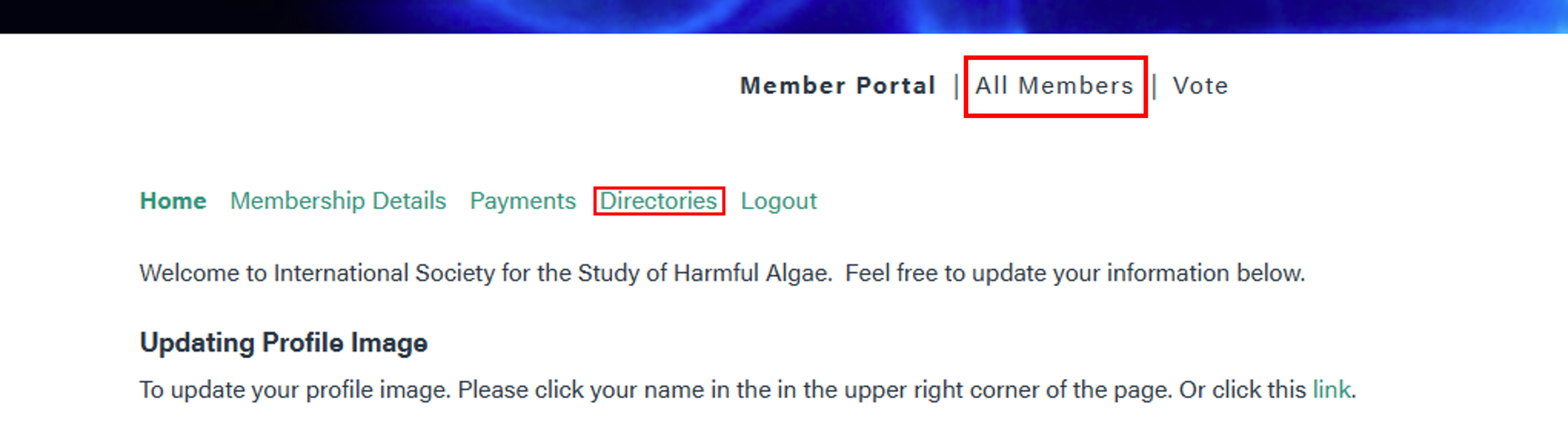
To access the new member portal, log in with your ISSHA credentials and click “All Members”. To opt-out, click on “Directories”